
Table of Contents
AI crawler tracking monitors how bots like GPTBot and ClaudeBot access your website, providing visibility into which content trains AI models and how these crawlers impact server performance. Understanding AI crawler behavior helps you make informed decisions about allowing or blocking these bots while protecting your SEO rankings and site resources.
Website owners face a new challenge: AI companies are scraping content to train large language models, often without clear disclosure. These crawlers consume bandwidth, affect server load, and use your content in ways that may or may not benefit your business. Unlike traditional search engine bots that drive traffic, AI crawlers extract information without necessarily sending visitors back to your site.
The good news? You can monitor, analyze, and control AI crawler activity. With proper AI crawler tracking, you’ll see exactly which bots visit your site, what content they access, and how much server resources they consume. This data empowers you to make strategic decisions about which AI crawlers to allow, which to block, and how to protect your competitive advantage while maintaining your search engine visibility.
What Are AI Crawlers and Why Track Them?
What they are. Specialized bots from AI companies (GPTBot, ClaudeBot, Google-Extended, Anthropic-AI) that scan the web to collect text, images and structured data for training LLMs like ChatGPT, Claude and Gemini.
Key difference vs. Googlebot. Googlebot indexes your content and sends traffic back when users click through — a fair value exchange. AI crawlers extract your content so the model can answer users directly, with no attribution and no referral traffic. The traditional content-for-visibility deal breaks down.
Why tracking matters:
- Bandwidth costs. These bots hit the same pages repeatedly across retraining cycles.
- IP transparency. Site owners want visibility into how their content is being used to train commercial AI products.
- Competitive intelligence. Knowing which pages AI companies crawl most reveals what they consider valuable — a signal about your strongest content assets.
Legal and ethical gray area. Publishers and creators argue AI companies profit from training data without compensating originators. Some see it as fair use, others as unauthorized commercial exploitation. Without tracking, you can’t make informed decisions about whether to allow, block or negotiate access.
Distinct traffic behavior. AI crawlers hit pages rapidly and systematically, at odd hours, often targeting deep archive content human users rarely reach. They don’t follow normal user flows and can create traffic spikes unrelated to your campaigns or seasonality — which is exactly why they’re invisible in standard analytics.
Does Blocking AI Crawlers Hurt Your SEO?
Short answer: no direct impact. Googlebot and Google-Extended are separate crawlers with different jobs — Googlebot indexes for search, Google-Extended collects for AI training. Blocking Google-Extended, GPTBot or ClaudeBot has zero direct effect on your traditional search rankings.
But there’s an indirect angle worth watching. As AI-generated answers increasingly appear in search results (Google AI Overviews, Bing Copilot, etc.), sites that blocked AI crawlers may end up less represented or attributed in those AI responses. Not a ranking penalty today, but a visibility consideration for tomorrow.
Crawl budget and server load. Every site has a finite crawl budget. When AI bots pile onto your server alongside Googlebot, they can slow response times or trigger rate limiting that affects legitimate crawlers. On large sites, that can delay how quickly Google picks up your content updates.
The long-term shift in user behavior. As users get answers directly from ChatGPT, Claude or AI-powered search without clicking through, traffic patterns change fundamentally. Sites that allowed training may gain attribution in AI answers; sites that blocked it may become invisible in AI-mediated discovery. Still speculative, but tracking crawler activity now gives you the data to make informed decisions as this evolves.
Security bonus. Monitoring AI crawler behavior also surfaces spoofed user agents — bad actors impersonating GPTBot or ClaudeBot to mask reconnaissance, content scraping or DDoS activity. Real crawlers have predictable patterns (frequency, endpoints, geo). Anything outside those patterns is a signal worth blocking at the server level.
Identifying AI Crawlers in Your Server Logs
Common user agents. Each AI crawler announces itself with a distinctive string:
- GPTBot (OpenAI) →
GPTBot/1.0 - ClaudeBot (Anthropic) →
ClaudeBot/1.0and variants - Google-Extended →
Google-Extended - CCBot (Common Crawl, feeds many AI projects) →
CCBot/2.0 - Anthropic-AI → various forms during ongoing testing
These identifiers let you filter AI traffic separately from humans and traditional search bots.
Where to find them. Apache logs at /var/log/apache2/access.log or /var/log/httpd/access.log, Nginx at /var/log/nginx/access.log. Each entry shows the user agent in quotes after the status code and byte count. On WordPress, you can access this through hosting panels (cPanel, Plesk), security plugins, or analytics plugins that parse bot activity.
Don’t trust the user agent alone. Any bot can claim to be GPTBot by sending that string — verification requires checking the source IP. OpenAI, Anthropic and Google publish IP ranges and support reverse DNS verification. Real crawlers resolve to domains owned by their companies.
Two-step IP verification. The reliable method:
- Reverse DNS lookup on the source IP — should resolve to a hostname containing the company’s domain (e.g.
anthropic.com). - Forward DNS lookup on that hostname — should resolve back to the original IP.
This prevents spoofing, since attackers can’t control reverse DNS for IPs they don’t own.
Why manual analysis breaks down fast. Parsing thousands or millions of log entries by hand is slow and error-prone. User agents shift between versions, IP ranges evolve, and meaningful patterns only emerge when you aggregate across time. Automated tools solve this by continuously monitoring logs, verifying authenticity, categorizing bots and surfacing actionable analytics — without anyone babysitting log files.
SysWP AI Crawler Tracking Features
Summary: The SysWP AI Crawler Tracking Dashboard
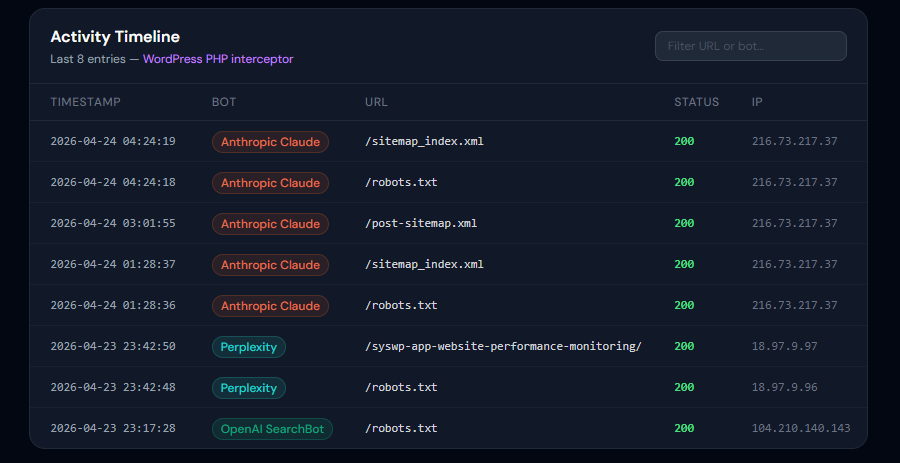
Unified visibility across sites. The dashboard at app.syswp.pro/ai-crawler-tracking auto-detects and categorizes AI crawler activity across all connected WordPress sites — no manual log analysis or server config required. GPTBot, ClaudeBot, Google-Extended and others are surfaced in a single interface, with cross-site comparisons across your portfolio.
Real-time monitoring. Every crawler request is logged, IP-validated and reflected on the dashboard as it happens. That immediacy lets you:
- See the instant effect of
robots.txtchanges - Spot crawler surges tied to model retraining cycles
- React fast to suspicious bot behavior that warrants blocking
Core metrics tracked:
- Request frequency — which AI companies crawl hardest
- Pages accessed — what content AI prioritizes
- Bandwidth consumed — real infrastructure cost of AI training traffic
- Response codes — whether your blocks are actually working
Pattern analysis and visualization. Beyond raw numbers, SysWP surfaces behavioral patterns: crawling schedules (which bots prefer which hours), content preferences (fresh vs. archive), and crawl depth (how far into your site they go). Delivered through timeline graphs, heatmaps of most-crawled sections, and comparative charts across crawlers.
Automated alerts. You get notified when:
- Request rates exceed your thresholds
- A new AI user agent appears
- Bandwidth spikes unexpectedly
- Behavior deviates from established patterns
Useful for catching retraining cycles, spoofed crawlers, and shifts in how AI companies collect data.
Tight integration with AI Brand Intelligence. The crawler dashboard pairs with app.syswp.pro/ai-brand-intelligence to close the loop between input and output:
- Crawler tracking → what AI takes from your site
- Brand Intelligence → how AI references your brand in responses
That pairing measures the actual value exchange. If ClaudeBot crawls heavily but Claude rarely mentions your brand, you’re subsidizing training with no return. If GPTBot crawls moderately but ChatGPT recommends your products often, access is paying off. Data-driven decisions replace speculation on who to allow and who to block.
Controlling AI Crawler Access with Robots.txt
Specific robots.txt syntax to block AI crawlers follows standard robots exclusion protocol with crawler-specific user agent declarations. To block GPTBot, add these lines to your robots.txt file:
“ User-agent: GPTBot Disallow: / “
For ClaudeBot, use:
“ User-agent: ClaudeBot Disallow: / “
To block Google-Extended without affecting regular Googlebot:
“ User-agent: Google-Extended Disallow: / “
These directives tell the respective crawlers not to access any pages on your site. You can block multiple AI crawlers by including separate user agent blocks for each.
Selective blocking allows you to permit some AI crawlers while restricting others based on your strategic preferences. You might allow Google-Extended because you value Google’s AI integration while blocking GPTBot and ClaudeBot. Alternatively, you might block all AI crawlers except those from companies with which you have partnerships or whose AI products you prefer. Selective blocking also enables partial access—allowing crawlers to access your blog while protecting proprietary documentation. For example:
“ User-agent: GPTBot Disallow: /documentation/ Disallow: /proprietary/ Allow: /blog/ “
The limitations of robots.txt center on voluntary compliance and lack of enforcement mechanisms. Robots.txt represents a request, not a technical barrier. Well-behaved crawlers respect these directives, and major AI companies like OpenAI, Anthropic, and Google have committed to honoring robots.txt rules. However, nothing technically prevents a crawler from ignoring your robots.txt file. Malicious actors or less scrupulous data collectors may disregard these directives entirely. Additionally, robots.txt files are publicly accessible, potentially revealing site structure or indicating which sections you consider most valuable.
Verifying your robots.txt configuration requires testing both the file’s accessibility and crawler compliance. First, ensure your robots.txt file is accessible at https://yourdomain.com/robots.txt by visiting that URL in a browser. Check that your AI crawler blocking directives appear correctly. Use Google Search Console’s robots.txt tester to verify syntax correctness. Then, monitor your server logs or SysWP dashboard to confirm that AI crawlers actually respect your directives. You should see requests to your robots.txt file from AI crawlers, followed by either no subsequent requests (if they’re complying with a full block) or requests only to allowed sections (if you’re using selective blocking).
When to use robots.txt versus server-level blocking depends on your trust level and security requirements. Robots.txt works well for blocking legitimate, well-behaved AI crawlers from major companies that respect these standards. It’s easy to implement, requires no technical expertise, and can be updated quickly without server configuration changes. Server-level blocking becomes necessary when you need guaranteed enforcement, want to block crawlers that ignore robots.txt, need to protect against aggressive scraping, or require more sophisticated control like rate limiting. For most website owners dealing with major AI companies, robots.txt provides sufficient control; for high-value proprietary content or when dealing with suspicious crawler behavior, server-level blocking offers stronger protection.
Advanced AI Crawler Management Strategies
Server-level blocking using .htaccess or Nginx configuration provides enforceable control over AI crawler access that doesn’t rely on voluntary compliance. In Apache servers with .htaccess enabled, you can block specific user agents by adding directives to your .htaccess file. To block GPTBot:
“ SetEnvIfNoCase User-Agent "GPTBot" badbot Deny from env=badbot “
For multiple crawlers, add additional SetEnvIfNoCase lines for each user agent. In Nginx, add directives to your server configuration block:
“ if ($httpuseragent ~* (GPTBot|ClaudeBot|Google-Extended)) { return 403; } “
These configurations return a 403 Forbidden response to matching crawlers, preventing access regardless of robots.txt compliance.
Rate limiting controls AI crawler frequency without implementing full blocking, allowing data collection while protecting server resources. This approach acknowledges that AI training might provide some value while preventing crawler activity from overwhelming your infrastructure. Nginx’s limit_req module enables sophisticated rate limiting:
“` limitreqzone $httpuseragent zone=aibots:10m rate=10r/m;
location / { if ($httpuseragent ~* (GPTBot|ClaudeBot)) { limit_req zone=aibots burst=5; } } “`
This configuration limits AI crawlers to 10 requests per minute with a burst allowance of 5 additional requests. Apache can implement similar functionality through mod_ratelimit or third-party modules.
Conditional access strategies allow crawlers to access specific sections while protecting others, creating nuanced policies that balance openness with content protection. You might permit AI crawlers to access marketing content and blog posts (which benefit from AI visibility) while blocking access to proprietary research, member-only content, or competitive intelligence. In .htaccess:
“` SetEnvIfNoCase User-Agent “GPTBot” is_aibot
<Directory “/var/www/html/proprietary”> Deny from env=is_aibot </Directory>
<Directory “/var/www/html/blog”> Allow from env=is_aibot </Directory> “`
This approach requires thoughtful content categorization but enables sophisticated policies aligned with business objectives.
Monitoring the effectiveness of blocking rules through SysWP analytics closes the feedback loop between implementation and verification. After implementing robots.txt directives or server-level blocks, SysWP’s dashboard should reflect reduced or eliminated requests from targeted crawlers. Compare request volumes before and after implementing blocks, verify that blocked crawlers receive appropriate HTTP status codes (403 for server blocks, or simply no requests for compliant robots.txt blocking), and confirm that allowed crawlers continue accessing permitted sections. Discrepancies between expected and actual behavior might indicate configuration errors, crawler user agent changes, or non-compliant bots spoofing legitimate crawler identities.
The balance between openness and protecting proprietary content requires strategic thinking about your content’s value and competitive positioning. Complete blocking protects your intellectual property but excludes you from AI training datasets that might increase brand visibility in AI-generated responses. Full openness maximizes AI exposure but allows competitors to benefit from your content through AI intermediaries. The optimal approach typically involves categorizing content by strategic value: freely allow crawler access to marketing materials, thought leadership, and content designed to build awareness; implement rate limiting on general informational content to control resource consumption; strictly block access to proprietary methodologies, competitive research, premium member content, and unique data assets. This tiered approach protects your most valuable assets while maintaining presence in AI training datasets where it benefits your business objectives.
Turning AI Crawler Data Into Business Intelligence
Crawler behavior reveals what AI considers valuable. When ClaudeBot or GPTBot repeatedly hits specific pages, spends bandwidth on certain content types, or returns across multiple visits, it’s signaling training value. Pages that get disproportionate AI attention usually have high information density, unique perspectives or structured data LLMs prefer — and these qualities often differ from what drives human engagement or traditional SEO performance.
Closing the loop with brand intelligence. SysWP’s AI Brand Intelligence integration (app.syswp.pro/ai-brand-intelligence) connects crawler access data with how AI systems actually reference your brand. It answers questions like:
- Does allowing GPTBot correlate with more ChatGPT mentions?
- Did blocking ClaudeBot reduce Claude’s references to your products?
Combining crawler patterns with mention frequency, sentiment and context replaces guesswork with measurable ROI on AI training access.
Content gap detection. Crawler priorities expose content opportunities. If bots hammer your technical docs but skip your case studies, information-dense content is more training-relevant. If GPTBot heavily crawls competitor pricing pages but you don’t have one, that’s a visible gap. Mapping crawler behavior across your content inventory shows which topics, formats and structures AI systems reward — guiding where to invest creation effort for AI visibility.
Competitive benchmarking. SysWP’s anonymized aggregated data shows whether your site draws more or less AI crawler attention than peers. If competitors get significantly more GPTBot traffic, they’re likely producing content types AI values more. If you’re above average, your strategy is already aligned with AI training priorities. This context helps you decide where to increase engagement — or where to tighten access.
The strategic feedback loop. Crawler data informs both content creation and protection:
- High-value + proprietary → consider blocking or rate limiting.
- High-value + drives brand mentions → expand and update to stay relevant.
- Ignored entirely → reformat, densify, or question its strategic value.
Data-driven decisions replace speculation on what to protect, expand or cut.
Future-Proofing Your AI Crawler Strategy
Summary: Future-Proofing Your AI Crawler Strategy
The crawler landscape will keep expanding. Beyond today’s big three (GPTBot, ClaudeBot, Google-Extended), expect bots from Meta, Mistral, Cohere and other Western labs, plus Chinese players (Baidu, Alibaba, Tencent) and open-source AI projects. Each new crawler brings its own user agents, IP ranges and behaviors that need identification and a policy decision.
Continuous monitoring is non-negotiable. New user agents appear without announcement, existing crawlers shift their signatures, and some companies deploy multiple bots for different purposes. Weekly or monthly reviews of unidentified bot traffic — through a dashboard like SysWP’s — let you catch emerging crawlers before they consume real resources. Industry news, AI company dev blogs and crawler-management communities help you anticipate what’s coming before it shows up in your logs.
Regulation is moving. Several frameworks are taking shape:
- EU AI Act may require disclosure of training data sources.
- California has proposed transparency legislation that could enforce opt-out rights.
- Japan already has AI training data regulations influencing global practice.
Likely consequences: mandatory crawler ID standards, consent mechanisms before training, compensation frameworks, and penalties for ignoring robots.txt. Tracking these trends now positions you for compliance later.
Every organization needs a written AI crawler policy. A good one covers:
- Which crawlers are allowed by default
- Criteria for blocking specific crawlers
- How to evaluate new crawler requests
- Differentiated rules per content category
- Review frequency
- Who owns monitoring and enforcement
Document the why — blocking to protect IP, allowing for maximum AI visibility, or a hybrid based on partnerships. A written policy keeps decisions consistent as conditions change.
How SysWP stays current. The platform updates its crawler detection database continuously by tracking AI industry developments, ingesting IP range changes and incorporating community feedback. When a SysWP user flags unidentified bot traffic that turns out to be a new crawler, the central detection database updates — and every user benefits immediately. No manual research required per site.
FAQ
Does blocking AI crawlers hurt my Google rankings?
No, blocking AI crawlers like GPTBot or ClaudeBot does not directly affect your Google search rankings. These bots operate independently from Googlebot, which handles all search indexing and ranking decisions. You can selectively block AI crawlers in your robots.txt file without impacting how Google discovers and ranks your pages.
How can I tell if GPTBot is crawling my website?
Check your server logs for the user agent string ‘GPTBot’ to identify OpenAI’s crawler activity. For automated AI crawler tracking, use SysWP’s AI Crawler Tracking feature, which identifies and monitors GPTBot visits in real-time without manual log analysis. This gives you visibility into crawl frequency, pages accessed, and bandwidth consumption.
What’s the difference between GPTBot and ClaudeBot?
GPTBot is OpenAI’s web crawler that collects training data for ChatGPT and other OpenAI models. ClaudeBot is Anthropic’s crawler that gathers content to train Claude AI. While both serve similar purposes—collecting web content for AI training—they operate for different companies and AI systems, meaning blocking one doesn’t affect the other.
Should I block AI crawlers from my website?
The decision depends on your content strategy and business goals. Blocking AI crawlers prevents your content from being used in AI model training but may reduce your visibility in AI-generated responses and citations. Use SysWP’s AI crawler monitoring to assess actual crawler impact before making blocking decisions.
How much bandwidth do AI crawlers typically use?
AI crawler bandwidth usage varies widely based on your site size, content volume, and update frequency. Small sites may see negligible impact, while large content sites can experience several gigabytes of crawler traffic monthly. SysWP’s AI crawler tracking quantifies your specific bandwidth usage, helping you make informed decisions about crawler access.