
Table of Contents
We spent three weeks fixing a checkout that wouldn’t work. Wordfence Premium said the site was clean.
An online store. Payments failing on the first attempt. On mobile, choosing “card” left the security code field clipped. The client was losing sales every day and nobody could tell her why.
So we did what everyone does.
We swapped the payment plugin. Then we swapped it again. We ran a full scan with Wordfence Premium — clean, nothing found. We adjusted the reCAPTCHA. We cleared caches, tested across browsers, disabled features one at a time, and read the gateway logs line by line.
Every fix held for a day. Then the problem came back.
Three weeks. Neither the client nor we had the faintest idea what was actually happening.
Site Doctor finally showed up
We looked at the DOM on a real phone and saw something odd: the Stripe payment form was mounting twice. One correct iframe, and another collapsed to 0×0 inside the same container. The height sync was talking to the wrong iframe — which is why the field came out clipped.
The next question is the one that broke it open: what was duplicating the iframe?
A code snippet belonging to the site itself. A legitimate one, written by the team weeks earlier, that somebody had added a function to:
$custom_recaptha_license_token = 'PHNjcmlwdD5jb25zdCBsb2FkanMg…';if ( ! is_checkout() ) { return; }echo base64_decode( $custom_recaptha_license_token );Look at the detail: the variable is called recaptha. Misspelled deliberately, so your eye reads “reCAPTCHA” and moves on. And the code only runs on checkout — which is exactly why every test we ran anywhere else came back clean.
Decoding the base64 gave a <script> loading external JavaScript from a domain that wasn’t ours.
A card skimmer. It had been stealing from that store while we blamed the gateway, the cache and the browser.
What was underneath
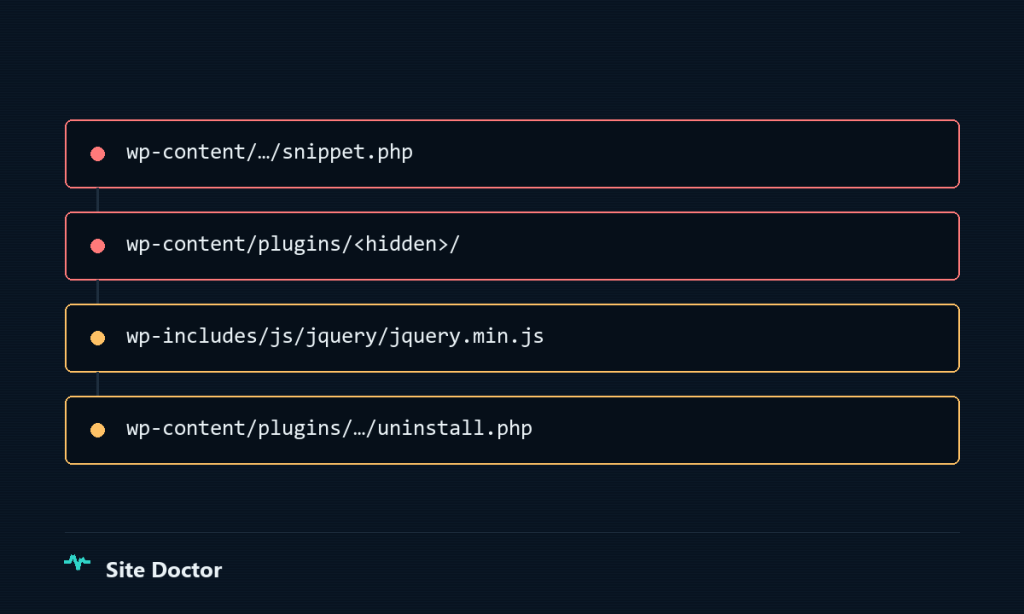
We pulled that thread. What came up:
A backdoor plugin planted five months earlier, with an invented name, signed as though a WordPress core developer had written it. It removed itself from the plugin list in wp-admin, and reactivated itself if you deactivated it — on admin_init and on shutdown. Deactivating did nothing; you had to delete the files.
On every login it shipped the username and the password in plaintext to a remote server whose address was AES-encrypted inside the source. That ran for five and a half months, which is why credential rotation wasn’t optional.
WordPress core’s own jQuery with roughly 6 KB of obfuscated code appended past the legitimate library. It loaded on every page.
A file-inclusion backdoor hidden in the uninstall.php of a popular, entirely unrelated plugin.
Three fake administrator accounts, one of them created through the API with Postman — not through the dashboard — using the backdoor as the executor.
Removing any single one of them would have left the site owned.
The detail that closes the loop
When we cut the skimmer, the double mount disappeared.
The rendering bug we chased for three weeks was the malware. Not a parallel symptom, not a coincidence: the same line of code stealing the cards was the one breaking the form.
From running the scan to a clean site: about an hour.
Three things I took from it
1. A strange, persistent bug can be a symptom rather than a cause. If something “makes no sense” after you’ve ruled out the obvious, consider that somebody else is executing code on your site.
2. A green security plugin is not evidence that you’re clean. The backdoor hid from the plugin listing itself. What gave it away was comparing core files against the official checksums — wp core verify-checksums exposed the tampered jQuery, and wp plugin verify-checksums found the LFI. Neither is clever. They’re just rarely run.
3. The entry point wasn’t “the hack”. It was one low-privilege user account. The backdoor did the rest.
And one thing we could not determine: the original entry vector. The host’s logs for that month were already past their retention window. That stays an open hole in our own report rather than something we can claim we closed.
Who found it, and who stops it
Worth separating, because these are two of our tools and they do different jobs.
Site Doctor found it. It reads the whole site in read-only mode — files, database, options, cron, the plugins’ own source — and that’s where the snippet turned up, along with the plugin hiding from its own listing and the 6 KB glued onto jQuery.
SysWP Shield is what blocks it. Once you know what to look for, it keeps it out.
Wordfence Premium was installed, active and up to date. It ran, and it came back clean.
Before you click
Site Doctor is a read-only plugin you install once per site. After that you ask it questions in plain language — through Claude or ChatGPT — and it goes and finds the answer inside the site. It cannot change anything: the write operation does not exist in its code. That’s why you can install it on a client’s site without asking anyone’s permission.
If you manage WordPress sites and you’ve had that moment of “the plugin says it’s clean but something is clearly wrong”, take a look.
Or send us one site. We’ll look and tell you in writing what we found within 24 hours — including if we find nothing.