
Every site owner has wondered the same thing: of the requests hitting my site right now, how many are real humans? How many are scrapers? How many are AI bots burning my bandwidth? How many are actual attacks?
For the last 15 years the answer has been the same: nobody knows, because no plugin shows it. Wordfence shows you blocks. Sucuri shows you blocks. Cloudflare shows you blocks. Nobody shows you the complete breakdown.
We just shipped the plugin that does. SysWP Shield is live, free to use, and ready for WordPress 7 from day one.
What we built
SysWP Shield is a behavioral firewall + cross-stack threat intelligence network. The free tier already includes the full 16-signal detection engine. Premium adds the cross-site network, multi-site management, and richer reporting.
What makes it different — and what no other WordPress security plugin does today:
1. The Traffic Mix donut
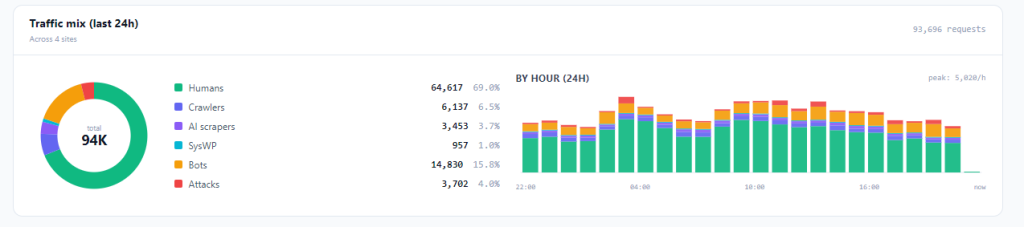
Every request that hits your site is classified into one of six categories, visible at a glance both in your wp-admin AND in your SaaS dashboard:
- 🟢 Humans — real visitors
- 🟪 Crawlers — Googlebot, Bingbot, Facebook, Apple, etc. — verified by Forward-Confirmed Reverse DNS (the gold standard, not just a UA string match)
- 🟣 AI scrapers — GPTBot, ClaudeBot, CCBot, PerplexityBot, Bytespider, Meta-ExternalAgent, +15 more
- 🔵 SysWP — our own infrastructure scanners (so when you audit your access logs you don’t confuse them with attackers)
- 🟧 Bots — throttled scrapers (suspicious but not blocked)
- 🟥 Attacks — blocked malicious traffic
Internal admin chatter (wp-cron, Gutenberg AJAX, your own admin polling) is excluded. The percentages reflect what your actual visitors are doing.
2. AI scrapers, properly classified — not lumped together
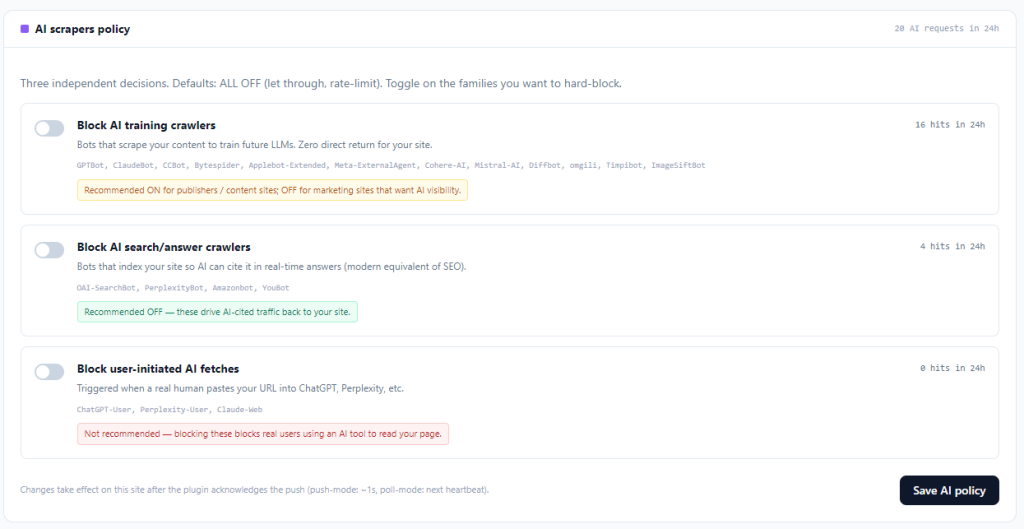
Every AI scraper plugin we evaluated treats them as one big bucket: “block AI bots: yes/no.” That’s a terrible way to make this decision because AI bots aren’t all alike.
We split them into three independent toggles:
- Training crawlers (GPTBot, ClaudeBot, CCBot, Bytespider…) — scrape to train future LLMs. Zero direct return to your site. Most publishers want these blocked.
- Search/Answer crawlers (OAI-SearchBot, PerplexityBot, Amazonbot, YouBot…) — index your site so AI can cite it in real-time answers. The modern equivalent of SEO. Most sites should leave these ON.
- User-initiated (ChatGPT-User, Perplexity-User, Claude-Web) — triggered when a real human pastes your URL into ChatGPT or Perplexity. Blocking these blocks real users.
You see the 24-hour hit count next to each toggle, so you can decide based on your actual traffic, not generic advice.
3. Cross-stack network intelligence
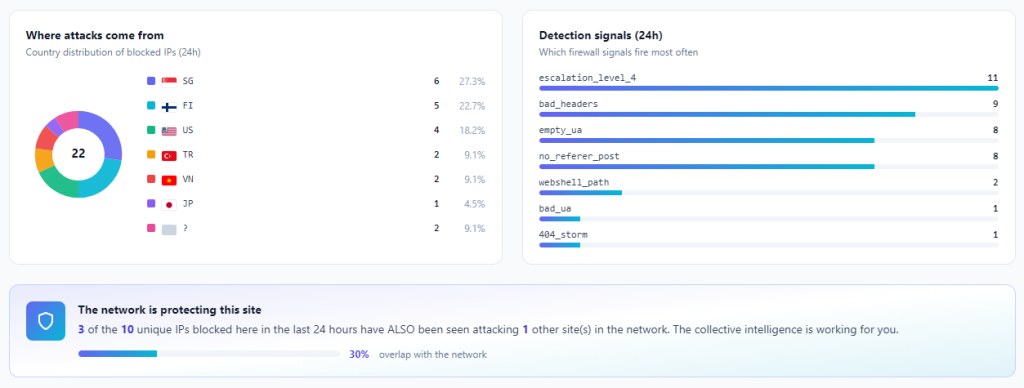
When an attacker hits one site in our network, every other site can block them within minutes — without burning a single CPU cycle on detection. The consensus engine promotes IPs that 2+ independent sites flag as malicious within a 24-hour window. Higher signal-to-noise than a single-site reputation list.
4. Day-one WordPress 7 compatibility
WordPress 7 ships in less than a month. We’ve been testing against RC2 in production locally for weeks. Every admin tab renders, every hook fires, every cron schedules, every REST endpoint responds. The plugin already declares Tested up to: 7.0.
Most security plugins will lag the launch by 30+ days. We’re shipping ready.
5. Vulnerability scanning, by Wordfence Intelligence
Your installed plugins, themes, and WP version are matched against the Wordfence CVE database every heartbeat. When a critical vuln drops, you see a persistent admin notice on every wp-admin page (dismissible, but reappears when a NEW critical lands). Plus a weekly digest email summarizing what’s open and what got resolved.
Step-by-step: what your first hour looks like
If you’re skeptical (you should be — every plugin promises everything), here’s what actually happens once you install:
Step 1 — Install (30 seconds)
Download from shield.syswp.pro/plugin or search “SysWP Shield” in your Plugins → Add New. Install + activate. Free tier works immediately, no account needed.
Step 2 — Optional: connect to the SaaS (2 minutes)
The free tier protects your site without any account. To unlock the network feed, multi-site dashboard, AI scraper management, and vulnerability scanning, sign up at shield.syswp.pro, add your site, copy the api_key + api_secret shown ONCE, paste them in Shield → Settings → Connection, click Test connection. Should turn green in seconds.
The signup form pre-fills your preferred language based on your location — Brazilian visitors get Portuguese, Spanish-speaking countries get Spanish, everyone else gets English. Pricing is shown in USD with the approximate value in your local currency at today’s exchange rate.
Step 3 — First heartbeat (within 5 minutes)
The plugin sends its first heartbeat to the SaaS. Your site appears in the dashboard with last-seen-just-now status. Your installed plugin/theme stack is scanned against the vulnerability database. If anything comes back as critical or high, the persistent admin notice appears on your next wp-admin page load.
Step 4 — First Traffic Mix data (within 1 hour)
The plugin’s hourly aggregator runs and the donut populates with real numbers. Refresh your Shield → Dashboard tab and you’ll see your traffic broken down for the first time. Most site owners are surprised — turns out 15-30% of “their traffic” is actually bots they had no visibility into.
Step 5 — First AI bot detected (typically within 24 hours)
Most active sites get GPTBot, ClaudeBot, CCBot, or PerplexityBot crawls within a day. The AI scrapers slice of the donut fills in. Open Shield → Bot Management and you’ll see the per-purpose hit counts. Decide which to block.
Step 6 — First attack blocked (timing varies)
If your site has any public surface area, you’re already getting probes — wp-login brute-force, /xmlrpc.php abuse, exploit pattern scans. The Attacks slice of the donut grows. Check Shield → Logs for details.
Step 7 — Optional: add the footer badge (30 seconds)
Settings → General → Footer badge → choose a variant → Save. A small “Protected by SysWP Shield” link appears in your site footer, with referral attribution. If a visitor clicks through and signs up, your site is credited. Top referrers appear in the super-admin leaderboard.
Step 8 — That’s it
The plugin runs unattended after that. Daily housekeeping, hourly traffic aggregation, weekly digest emails, real-time push commands from the SaaS for emergency unblocks — all automatic. You only touch it when you want to tune behavior.
What’s NOT in the plugin (intentionally)
We’re proud of what we left OUT:
- No external CSS/JS bundles — the WP-admin renders with plain Tailwind utility classes inlined. No Chart.js, no React, no jQuery additions.
- No Composer dependencies — pure PHP, ships in a 1.5MB zip.
- No database lockout cycle — if our SaaS is unreachable, the plugin keeps protecting your site. Free tier works fully offline.
- No ads, no upsell modals — the only “buy this” UI is one card in Settings, and only when you exceed the free tier limits.
- No fake countdown timers, no scarcity dark patterns.
Pricing that doesn’t insult your intelligence
- Free: 1 site, 16-signal detection, attack mode, escalation. Network feed included.
- Starter ($9 USD/month, ≈ R$ 47 BRL): 3 sites, 30-day log retention, multi-site dashboard.
- Pro ($39 USD/month, ≈ R$ 203 BRL): 10 sites, 90-day retention, weekly digests, AI scraper management.
- Agency ($69 USD/month, ≈ R$ 359 BRL): 25 sites, white-label badge, priority support.
USD pricing across the board (Stripe bills in USD). BRL approximation shown to Brazilian visitors at today’s exchange rate so there’s no surprise at checkout.
What’s coming next
Phase 0 (vulnerability scanning, Wordfence sync) shipped today. Next on the roadmap:
- 2FA TOTP per-user — included in plugin, no MiniOrange/Wordfence Premium needed
- Phase 1 — AI Rule Generation — the SaaS proposes new firewall rules within hours of a CVE disclosure, validates them in a Browserless sandbox, then push-deploys to all sites
- Multi-stack expansion — Drupal module, Laravel package, Next.js middleware, Cloudflare Worker. Same network intelligence, every stack.
We don’t pre-announce dates. When something ships, you’ll see it in the changelog.
Try it
Download the plugin — works in minutes, free tier no credit card.
Read the docs — every feature explained, in English, Spanish, and Portuguese.
WordPress 7 readiness page — what we tested, what changed, why we’re confident.
If you find a bug, the rescue token in Settings → Connection is your emergency hatch. We documented every recovery path through cPanel + phpMyAdmin (no SSH required) because that’s how real customer hosting works.
Welcome to the network.
— The SysWP team