
Your Website Is Slower than you think
Try SYSWP App
And you don’t know it because you’re not measuring your real users. SysWP Appcombines lab testing, real user monitoring, AI crawler tracking, and WordPress optimization — all in one platform.
Sites Monitored
Pages Analyzed
%
Uptime SLA
Countries
The Problem With Current Tools
You’re paying for 5 different tools that don’t talk to each other
Google PageSpeed
Only shows lab data. Not what YOUR visitors actually experience. Different results every time you run it.
Google Analytics
Complex setup, cookie-dependent, blocked by adblockers. No real performance data. Privacy nightmare.
5+ Subscriptions
GTmetrix ($50), UptimeRobot ($20), Plausible ($25), Botify ($300)… That’s $500+/month for a complete picture.
One Snippet. Everything You Need.
SysWP replaces 5+ tools with a single line of code
Lab Data
PageSpeed Analysis
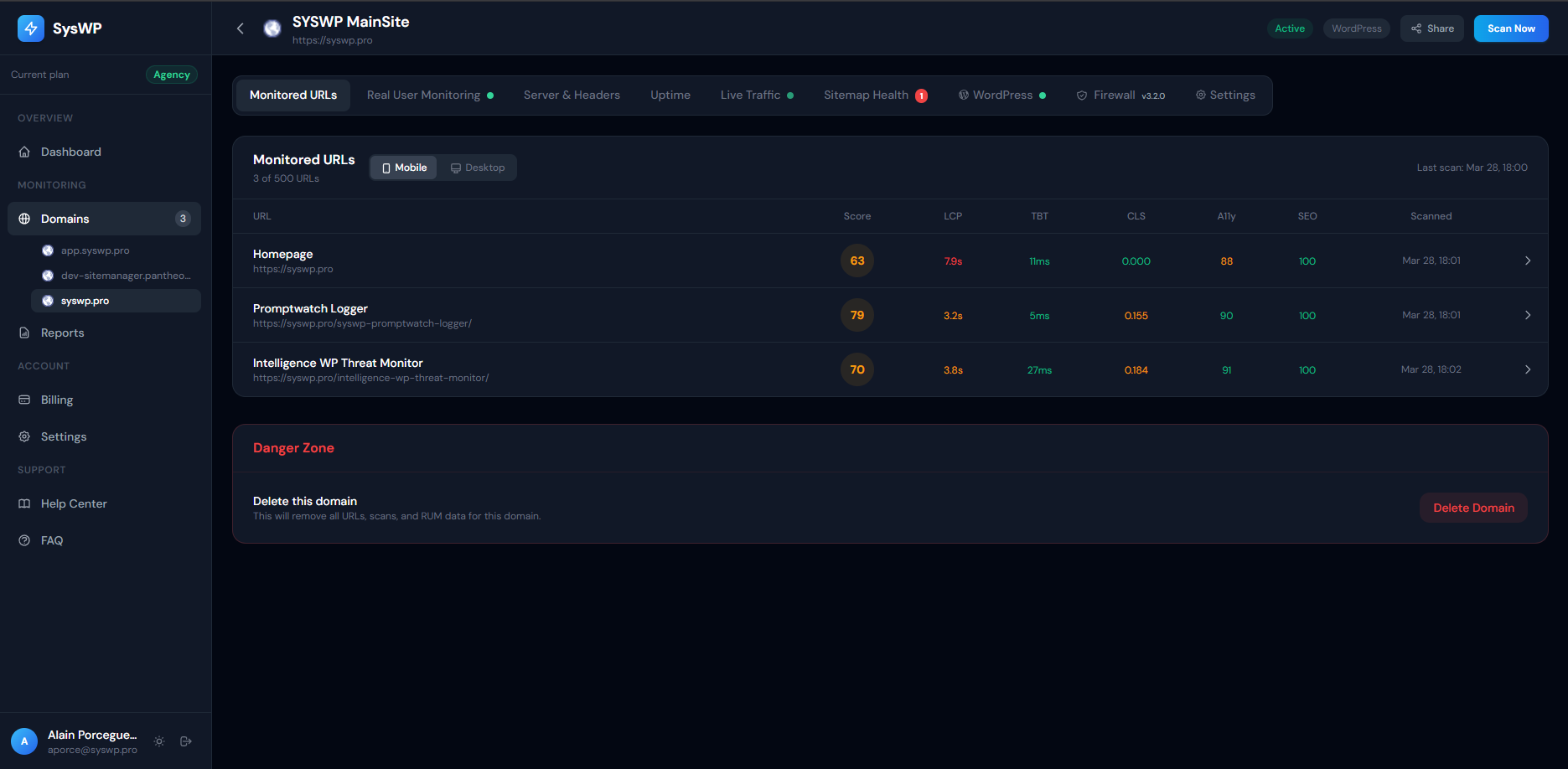
Google PSI API for mobile & desktop. Core Web Vitals, opportunities, diagnostics — all automated daily.
Field Data
Real User Monitoring
See how YOUR visitors experience your site. Real LCP, CLS, INP, TTFB from actual browsers and devices.
Exclusive
Bot & AI Tracking
Know when Googlebot, GPTBot, ClaudeBot, or Amazonbot visits. Track AI scraping in real-time.
Real-time
Live Traffic View
Watch visitors arrive with country flags, device info, browser, traffic source, and performance metrics.
24/7
Uptime Monitoring
Checks every 5 minutes. Instant alerts via email or WhatsApp. Full incident timeline tracking.
SEO
Sitemap Health
Auto-scans your sitemap for 404 errors, broken links, and redirect chains. Protect your SEO.
Security
Security & SSL Monitoring
SSL expiration alerts (30/14/7/1 day), HSTS, CSP, X-Frame-Options. Get notified before your certificate expires.
Reports
Shareable Reports
Beautiful reports with one click. Share via public URL. Automated biweekly delivery to your inbox.
WordPress
One-Click WP Login
Access your WordPress admin directly from the SysWP dashboard. Secure one-time tokens, no password sharing.
Integration
Threat Monitor Integration
Works with Intelligence WP Threat Monitor for unified performance + security. Firewall status visible in your dashboard.
WordPress Plugins
Safe Plugin Updates
Update WordPress plugins remotely with automatic backup, health check, and rollback. Never break your site again.
WordPress DB
Database Optimization
Monitor DB health score, clean transients, revisions, spam, and orphaned data. Optimize tables directly from the dashboard.
Built for WordPress.
Goes Deeper Than Any Snippet.
Our WordPress plugin captures server-side data that JavaScript alone can’t access. PHP execution time, database queries, memory usage, plugin conflicts — and lets you optimize directly from your SysWP dashboard.
Up and Running in 60 Seconds
No complex setup. No configuration hell. Just add and go.
1
Create Account
Sign up free. No credit card. Full 5-day trial.
2
Add Your Domain
Enter your URL. We auto-detect CMS and discover your sitemap.
3
Install Snippet
One line of code — or install our WordPress plugin.
4
Watch Data Flow
Real visitor data, scores, uptime — all in one dashboard.
Why Pay $500+/mo for 5 Tools?
SysWP App replaces them all at a fraction of the cost
Simple, Transparent Pricing
Start free. Upgrade when ready. Cancel anytime.
Trial
5 days, no card
Free
Starter
For freelancers
$19/mo
Pro
For WP site owners
$49/mo
Business
For agencies
$99/mo
Agency
For large teams
$149/mo
General
What is SysWP App?
SysWP App is a website performance monitoring platform. It combines Google PageSpeed lab data, real user monitoring (RUM), uptime tracking, sitemap health checking, and security auditing — all from one dashboard.
How is SysWP different from Google PageSpeed Insights?
PageSpeed Insights gives you a one-time snapshot. SysWP monitors continuously — tracking how your scores change over time, showing real user data (not simulated), detecting downtime, finding broken sitemap URLs, and alerting you to problems.
Does SysWP App slow down my website?
No. The monitoring snippet is less than 3KB, loads asynchronously, and uses the browser\’s sendBeacon API to transmit data without blocking page load. It has zero impact on your Core Web Vitals.
Does SysWP App use cookies?
No. SysWP does not set any cookies and does not track users across sites. We collect anonymous performance metrics only.
What browsers are supported?
The monitoring snippet works in all modern browsers: Chrome, Firefox, Safari, Edge, and their mobile versions. Web Vitals data depends on browser support (e.g., INP is Chrome-only).
Setup & Installation
How do I install the monitoring snippet?
Add a single <script> tag before your closing </body> tag. You’ll find the exact code in your domain’s Settings tab. For WordPress, we recommend using our plugin instead.
What's the difference between the JS snippet and the WordPress plugin?
The JS snippet collects client-side performance data (Web Vitals, device info). The WordPress plugin does all of that PLUS captures server-side data: PHP version, database queries, memory usage, installed plugins, theme info, and database health.
How do I know the snippet is working?
After installing the snippet, visit your site in a browser and wait 30 seconds. Then check the Real User Monitoring tab in your dashboard. If you see events, it’s working. The domain list also shows a green “Installed” badge.
Can I monitor non-WordPress sites?
Absolutely. The JS snippet works on any website: static HTML, React, Vue, Shopify, Squarespace, Wix — anything with an HTML page.
How do I find my Site ID?
Go to Domains, click your domain, then go to the Settings tab. Your Site ID (64-character hash) is shown there with a Copy button.
Performance & Scores
Why are my mobile scores lower than desktop?
Google simulates mobile on a mid-range device with throttled CPU and a slow 4G connection. This makes mobile scores naturally lower. It reflects how most of the world’s mobile users actually experience the web.
How often are PageSpeed scans run?
Depends on your plan: Starter runs 1 scan per day, Pro and Agency run 2 scans per day. You can also trigger manual scans from the URL detail page.
What's the difference between Lab Data and Real User Data?
Lab data (PageSpeed scores) is collected in a simulated, controlled environment — same device, same network every time. Real User Data (RUM) comes from actual visitors on their real devices and networks. Both are valuable: lab data for debugging, RUM for understanding actual user experience.
How do I improve my LCP score?
Common fixes: optimize and compress images (use WebP), enable server caching, minimize render-blocking CSS/JS, use a CDN, and upgrade your hosting if TTFB is high.
How do I find my Site ID?
Go to Domains, click your domain, then go to the Settings tab. Your Site ID (64-character hash) is shown there with a Copy button.
What are Opportunities and Diagnostics?
Opportunities are specific suggestions to improve load time (e.g., “Serve images in modern formats — save 1.2s”). Diagnostics are technical details about your page that may indicate problems. Both come from Google Lighthouse.
Monitoring Features
What is uptime monitoring?
SysWP App pings your domain every 5 minutes. If it fails 3 times in a row (15 minutes), we create an incident and send you an alert. When it comes back, you get a recovery notification.
What does Sitemap Health check?
We read your sitemap.xml and check every URL for HTTP errors. If a URL returns 404 (not found), 500 (server error), or redirects unexpectedly, we flag it. This helps you find broken pages before Google does.
What bots and crawlers do you detect?
We identify: Google (Googlebot, Googlebot-Image), Bing (Bingbot), Yahoo (Slurp), SEO tools (Ahrefs, Semrush, Moz), and AI crawlers (GPTBot, ClaudeBot, Amazonbot, Bytespider, CCBot).
What is Cache Warming?
Cache warming visits all your sitemap URLs so your server pre-builds and caches each page. This means the first real visitor gets a fast, cached response instead of waiting for the page to be generated. Find it in the Settings tab.
How does the security audit work?
We check your HTTP response headers for security best practices: HSTS (force HTTPS), CSP (prevent XSS), X-Frame-Options (prevent clickjacking), and more. We also verify your SSL certificate and measure server timing.
WordPress Plugin
Do I need the plugin if I already have the JS snippet?
Does the plugin work with caching plugins?
Yes. It detects and reports which cache plugin you\’re using (LiteSpeed, WP Rocket, W3 Total Cache, etc.) and whether object caching (Redis/Memcached) is enabled.
Can the plugin optimize my database?
Yes, but only if you explicitly enable it in the plugin settings. It can clean expired transients, old post revisions, spam comments, orphaned metadata, and optimize table fragmentation. All operations are logged.
Is the plugin data secure?
All communication between the plugin and SysWP is signed with HMAC-SHA256. Your API secret is stored encrypted in WordPress using wp_salt(). The plugin never exposes passwords, database credentials, or secret keys.
How does the security audit work?
We check your HTTP response headers for security best practices: HSTS (force HTTPS), CSP (prevent XSS), X-Frame-Options (prevent clickjacking), and more. We also verify your SSL certificate and measure server timing.
Billing & Account
How long is the free trial?
Can I change plans?
How do I cancel?
What payment methods do you accept?
Do you offer refunds?
Start Monitoring Your Website Today
5-day free trial. No credit card required. Full access to all features.
✓ No credit card ✓ Cancel anytime ✓ 5-day full trial ✓ HTTPS encrypted